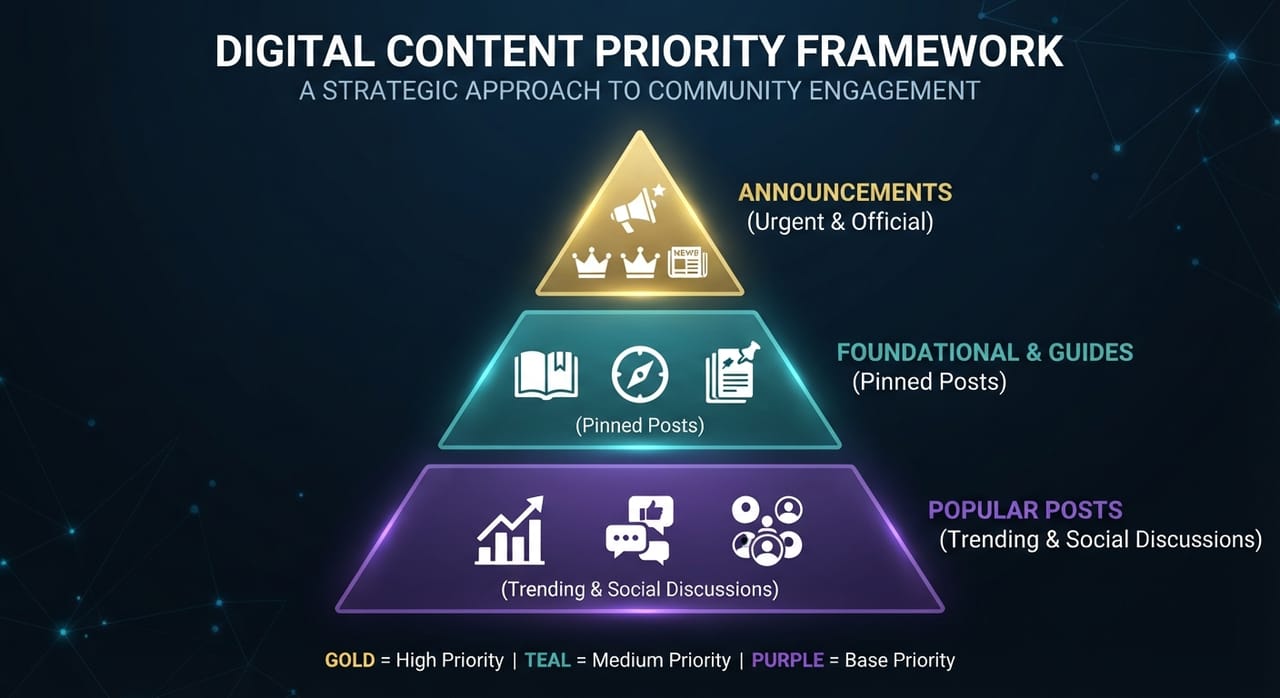
Every time you access an online community, forum, social network, or workspace communication channel, you are confronted with a massive stream of information. Getting overwhelmed by trending posts often causes people to waste time while missing critical updates. To optimize your time spent processing information and avoid costly mistakes, you need a clear order of priority among the three main types of content displayed at the top of your feeds: Announcements, Pinned Posts, and Popular Posts.
The Nature and Role of These 3 Information Types on Digital Platforms
Understanding the underlying purpose and technical origin of each post type is the foundation for accurate information filtering.
Announcements
Announcements are official statements issued by system administrators, platform owners, or organizational leaders. Information found here carries binding authority and directly affects your rights, account status, security, or operational workflow. Examples include system maintenance alerts, service terms changes, pricing updates, or scam warnings. This content offers maximum reliability and real-time urgency.
Pinned Posts
Pinned Posts (or Sticky Posts) are manually selected by moderators or administrators to remain fixed at the top of a feed. Their purpose is to provide foundational context for both new and existing members. Content here typically includes community rules, frequently asked questions (FAQs), resource directories, or codes of conduct. Pinned posts do not change hourly like urgent announcements, but they serve as the "north star" guiding how you interact within the community culture.
Popular Posts
Popular Posts are determined automatically by algorithms based on engagement metrics such as likes, comments, shares, or views. This content represents what is capturing the crowd's attention at any given moment. However, popular posts are highly subjective. A post becomes popular because it is entertaining, controversial, or emotionally resonant—not necessarily because it is accurate or practically useful.
A Step-by-Step Framework for Information Processing
To avoid falling into information traps, apply a structured three-step workflow ranked by descending urgency and reliability.
Step 1: Scan Announcements for Instant Updates
When logging into a platform, spend the first 5 to 10 seconds scanning the Announcements tab or tag. This immediately tells you: Is there an ongoing system outage? Did operational policies change today? Reading announcements first prevents redundant actions—such as submitting a bug report when a maintenance notice was already published.
Step 2: Check Pinned Posts for Foundational Context
Once you confirm there are no urgent system changes, move your attention to Pinned Posts. If you are a new member or preparing to ask a question, pinned posts contain roughly 80% of the answers you need. Carefully reading pinned content helps you grasp community operations, banned topics, and saves you time waiting for peer responses.
Step 3: Filter Popular Posts for Verified Discussions
Finally, once you understand official announcements and rules, expand into Popular Posts. Approach this content with critical thinking. Use popular posts to hear diverse perspectives, gather inspiration, or catch up on trends, but never treat them as objective truth without cross-referencing against official administrator posts.
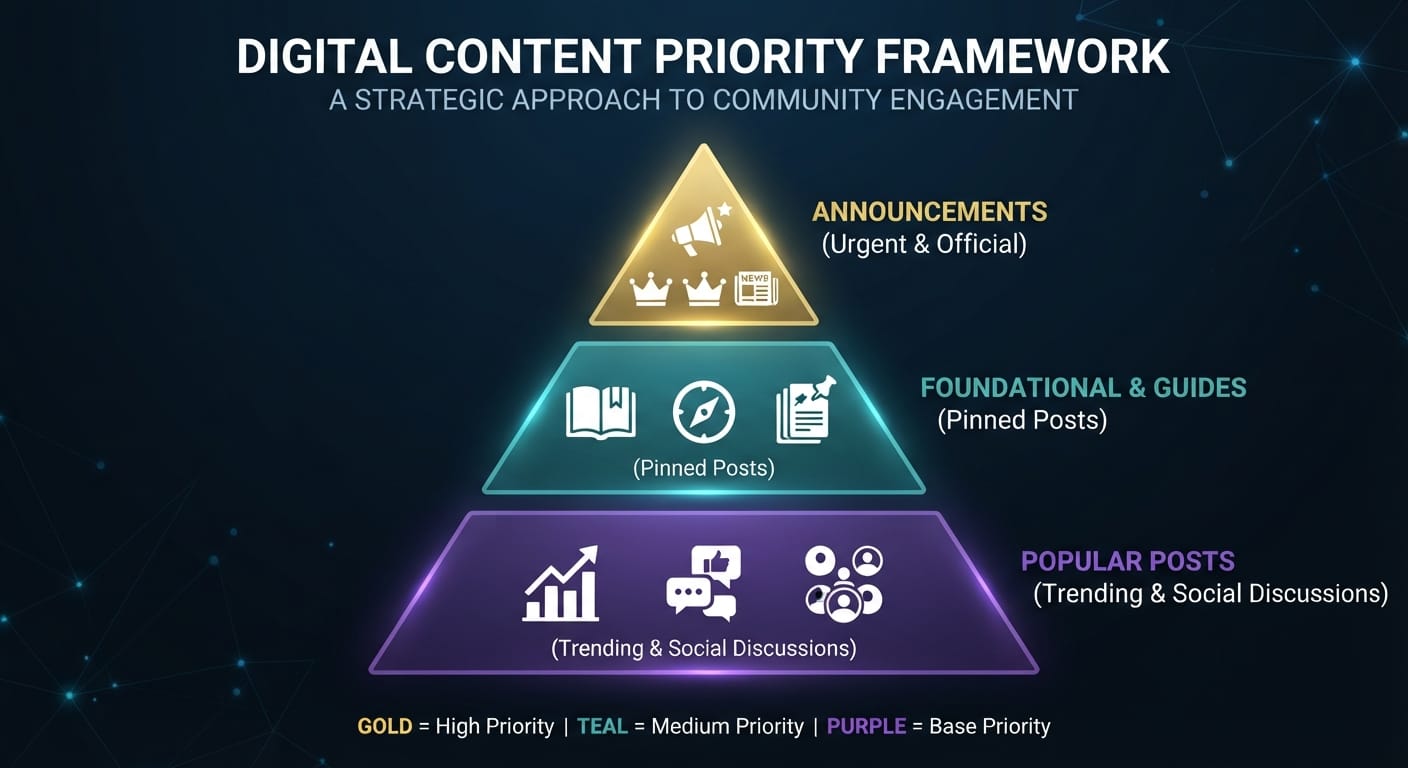
Visual Comparison: Announcements vs. Pinned Posts vs. Popular Posts
Comparison Criteria | Announcements | Pinned Posts | Popular Posts |
|---|---|---|---|
Creation Source | Admins / Platform Owners | Curated by Moderators | Algorithmic (Engagement-driven) |
Priority Level | Priority 1 (Urgent & Essential) | Priority 2 (Foundational) | Priority 3 (Reference / Social) |
Reliability | 100% (Official & Verified) | Very High (Vetted by Team) | Variable (Requires Verification) |
Update Frequency | Event-driven / Real-time | Fixed Long-Term | Constantly Changing (Hourly) |
Action Required | Read Immediately & Apply | Read for Rules & Guidelines | Read for Entertainment / Discussion |
Applying the Priority Strategy Across Different Platforms
Every platform features a distinct user interface requiring slight adjustments to your scanning habits:
- Social Networks (Facebook Groups, LinkedIn): Facebook often defaults to engagement-based feeds (Popular Posts). You must actively click on the "Featured" or "Announcements" tab to read key notices and pinned guides before scrolling through the main feed.
- Technical Forums & Discussion Boards (Reddit, Forums): On Reddit, Stickied Posts sit at the top when sorting by "Hot". Always read stickied posts before creating a new submission to avoid breaching Subreddit Rules.
- Workplace Collaboration Tools (Slack, Microsoft Teams, Discord): In professional environments, announcements live in dedicated channels like
#announcementsor#general. Checking these channels at the start of your workday keeps you synchronized with team operations before diving into open discussion channels.

Why Popular Posts Can Lead You Astray
Online platforms are engineered to keep users engaged for as long as possible. Content distribution algorithms prioritize Popular Posts because they contain high-emotion triggers like debates, controversial opinions, or viral trends.
Relying exclusively on Popular Posts exposes you to two major risks:
- Misinformation and Outdated Advice: A thread complaining about a software glitch might rack up thousands of interactions and sit atop the feed, even though developers already issued a patch fix in the Announcements channel hours prior.
- Echo Chamber Effect: Popular Posts reflect the loudest, most active subgroup of users, which may not represent accurate facts or the broader consensus of the entire community.
FAQ - Frequently Asked Questions
1. What should I do if an Announcement conflicts with a Pinned Post?
Always trust the information in the Announcement if it carries a more recent timestamp. Pinned Posts serve as long-term documentation, and moderators may occasionally delay updating them when new policies emerge in real-time announcements.
2. Can Popular Posts ever be more reliable than official posts?
In sudden emergency scenarios (such as an unexpected server crash before admins issue a formal statement), popular posts from early reporting users can help you gauge the situation faster. However, treat them as unverified indicators until officially confirmed.
3. How can I ensure I never miss Announcements on work applications?
Enable push notifications specifically for #announcements channels, or mark pinned work messages as "Unread" until you have fully processed and completed the required action.
4. What is the ideal time distribution among these three post types?
A healthy time distribution rule when browsing any community is: 20% of your time on Announcements (quick scan), 30% on Pinned Posts (when onboarding or referencing guidelines), and 50% on Popular Posts (for active discussion and networking).